

Migrating Mirth Connect to Open Integration Engine
A field guide by Rob Blackburn and the Blackburn Labs engineering team. We build and integrate healthcare software. We now migrate production Mirth Connect deployments to Open Integration Engine. The content below comes from real migration work, with all client-specific details removed. We checked each fact against primary sources in July 2026. Send corrections to info@blackburnlabs.com.
If you operate Mirth Connect, you know why you are here. In March 2025, NextGen Healthcare announced a license change for Mirth Connect. The product moved from a dual open-source and commercial model to a commercial license only, effective with version 4.6. Version 4.5.2 is the last open-source release, under the Mozilla Public License 2.0. It no longer receives updates, security patches, or bug fixes.
Within about one week of that announcement, veterans of the Mirth community forked the 4.5.2 code. Their project is Open Integration Engine (OIE). OIE is now the maintained open-source continuation of Mirth Connect. As of this writing, the OIE project has no official migration guide. This article is the guide we wanted when we started.
This guide is for the engineer who does the work. It covers the migration decision, the architecture choices, and the export and import steps. It also covers the compatibility problems, a test method that shows equivalence, the cutover plan, and the known pitfalls.
The Situation in Brief
A timeline of the important events:
- March 19, 2025. NextGen announces the license change. Open-source users get three options. They can stay on their current version without a time limit. They can move to 4.5.2, the last open-source release. Or they can buy a commercial license for 4.6 and later. (NextGen announcement)
- Late March 2025. The community founds the Open Integration Engine project. It is a fork of Mirth Connect 4.5.2, under MPL 2.0, with a formal public governance structure.
- June and July 2025. OIE ships its 4.5.2 releases. The release notes describe them as “functionally identical to Mirth Connect 4.5.2, with updated branding” and “fully suitable as a drop-in replacement for the original 4.5.2.”
- June 2026. OIE applies to join the Eclipse Foundation for vendor-neutral governance. As of this writing, this is an application, not a completed onboarding.
- July 9, 2026. OIE releases v4.6.0, its first divergent feature release. It requires Java 17, remediates 24 CVEs, and includes the breaking changes listed below.
A second fork exists. BridgeLink comes from Innovar Healthcare, and it is a valid alternative. This guide covers OIE for two reasons. We use OIE in our own migrations, and the OIE governance model continues the original open-source project.
INFO
Two products share one version number. NextGen sells a commercial “Mirth Connect 4.6” (closed source, announced March 2025). The OIE project released “OIE 4.6.0” (open source, July 2026). These are different products. OIE first kept the 4.5.2 version number for tool compatibility, then continued with its own version line. When someone says “4.6”, ask which product they mean.
Decide Whether to Migrate
There are three honest options. Migration is only one of them.
Option 1: Stay on Mirth Connect 4.5.2. This costs no effort today, and the license permits it without a time limit. But the risk increases over time, because 4.5.2 receives no security patches. OIE 4.6.0 alone remediated 24 CVEs in the shared dependency tree. One of them was a critical PostgreSQL JDBC driver vulnerability (CVE-2024-1597). Your 4.5.2 installation contains those same vulnerable dependencies.
Option 2: Buy the commercial license. If you depend on the NextGen commercial extensions (SSL Manager, Channel History, Advanced Alerting), and you have the budget, this is a valid choice. It includes vendor support. Get a price and compare it with the migration cost.
Option 3: Migrate to OIE. You keep the open-source model, and you get an engine with active security patches. OIE 4.5.2 is functionally identical to Mirth Connect 4.5.2, so the software compatibility risk is low. The project risk is in the items around the engine: extensions, keystores, JVM options, operations tooling, and the quality of your tests. The rest of this guide covers those items.
Choose a Target Version
There are two reasonable targets:
- OIE 4.5.2. Identical behavior to your current engine. It has the same Java requirements that you run today, and no behavior changes. This is a good first step if you want to change one variable at a time.
- OIE 4.6.0. This version has the security value (24 CVE remediations) and active development. It also has breaking changes: Java 17 minimum, removal of Xerces, and the behavior changes listed below.
Our recommendation from the field: if your hosts can run Java 17, or you use the installer with the included JRE, go directly to 4.6.0. The CVE remediation is the main reason to migrate. If your hosts cannot run Java 17 yet, migrate to OIE 4.5.2 first. Then plan the 4.6.0 upgrade as a separate, smaller project. A platform swap and a version jump in one step is possible. Two separate steps make each problem much easier to isolate.
Make the Architecture Decisions First
Decide these items before you export anything.
New hosts or an in-place swap? We strongly recommend new hosts, or new containers. OIE publishes official Docker images. A safe migration depends on parallel operation, and parallel operation is only possible if the old engine continues to run untouched.
A new database or the old one? OIE keeps the Mirth schema-migration code, and our code inspection shows compatible schemas. But no official OIE document approves a direct upgrade against an existing Mirth database. The conservative path is the one we use: a new installation, a new database, and a configuration import. If you decide to reuse a database, make a full backup first, and treat the result as unproven until your tests pass.
Select a production database. OIE includes the embedded Apache Derby database for development. The official documentation recommends a supported external database for production: PostgreSQL, MySQL, MariaDB, Oracle, or SQL Server. Use the same database type that you run under Mirth today unless you have a specific reason to change.
Keep the same network endpoints. Your sending systems (EMR, laboratory, devices) deliver messages to specific hosts and ports. Keep those endpoints stable through DNS cutover, load balancer changes, or IP takeover. Then the upstream teams do not have to change anything. This one choice can remove months from the cutover schedule.
Export Your Mirth Configuration
Mirth has three export mechanisms, and OIE keeps all three. Use all of them, because redundant exports are cheap.
1. The Administrator GUI exports channels, code template libraries, alerts, and the full server configuration as XML. The GUI is good for spot checks. It is not repeatable enough to be your system of record.
2. The CLI is the primary tool. On Mirth the command is mccommand. On OIE the same tool ships as oiecommand. Note that the -s flag takes a script file, not an inline command. Put the export commands in a file, one command per line, and pass the file:
# Write the export commands to a script file (one command per line)
cat > /backups/export-commands.txt <<'EOF'
exportcfg "/backups/mirth-config.xml"
exportmap "/backups/configuration-map.properties"
exportscripts "/backups/global-scripts.xml"
codetemplate library export * "/backups/code-templates/"
exportalerts * "/backups/alerts/"
EOF

# Run the script against the server
mccommand -a https://mirth-host:8443 -u admin -p '<password>' -s /backups/export-commands.txt
For one-off work, run mccommand -a https://mirth-host:8443 -u admin -p '<password>' with no -s flag. This opens an interactive prompt where you type the same commands. The script-file form is better for the scheduled, repeatable exports this guide recommends.
3. The REST API returns the same ServerConfiguration object in one call. Use it for scheduled exports:
curl -k -u admin:'<password>' \
  https://mirth-host:8443/api/server/configuration \
  -H "X-Requested-With: OpenAPI" -o mirth-config.xml
Also examine mirthSync, a third-party CLI tool. It pulls and pushes channels, code templates, configuration maps, and global scripts through the REST API, and it supports Git workflows. It works with both Mirth Connect and OIE. That makes it a good bridge: pull from one server, push to the other, and diff the files between the two steps.
Commit every export to version control. This makes the migration a reviewable and repeatable change, not a folder of XML files on one laptop. Also export a set of real production messages with exportmessages. You will need them for replay tests.
One item is not in any XML export: the keystore. Copy appdata/keystore.jks, and record the keystore.storepass and keystore.keypass values from your mirth.properties. See the pitfalls section for the reason.
Install OIE
The installation is familiar, and the configuration file is still named mirth.properties. The differences below are the ones that break operational procedures:
- Java 17 or later is required for current OIE, and version 4.6.0 enforces it. The installer with an included JRE avoids a host JVM upgrade.
- The CLI is
oiecommand, notmccommand. Update every scheduled job and deployment script that calls the CLI. An existing Mirth CLI client can still connect if necessary. - Custom JVM options move. Overrides now go in
<install-dir>/conf/oieserver.vmoptionsandconf/oieservice.vmoptions, not in the installation root. If you tuned heap sizes or GC flags on Mirth, move those settings, or they will not apply. - The Web Admin dashboard is removed. A minimal read-only status page replaces it. The “Mirth Manager” tray tool is also removed. Control the service with systemd, Windows Services, or launchd.
- Launchers: the original NextGen Mirth Administrator Launcher (MCAL) works with OIE. Open-source alternatives exist: Ballista and the BridgeLink launcher.
- Expect installer warnings from Windows SmartScreen and macOS Gatekeeper. The macOS override is in Privacy & Security settings.
- Change the default
admin/admincredentials at the first login.
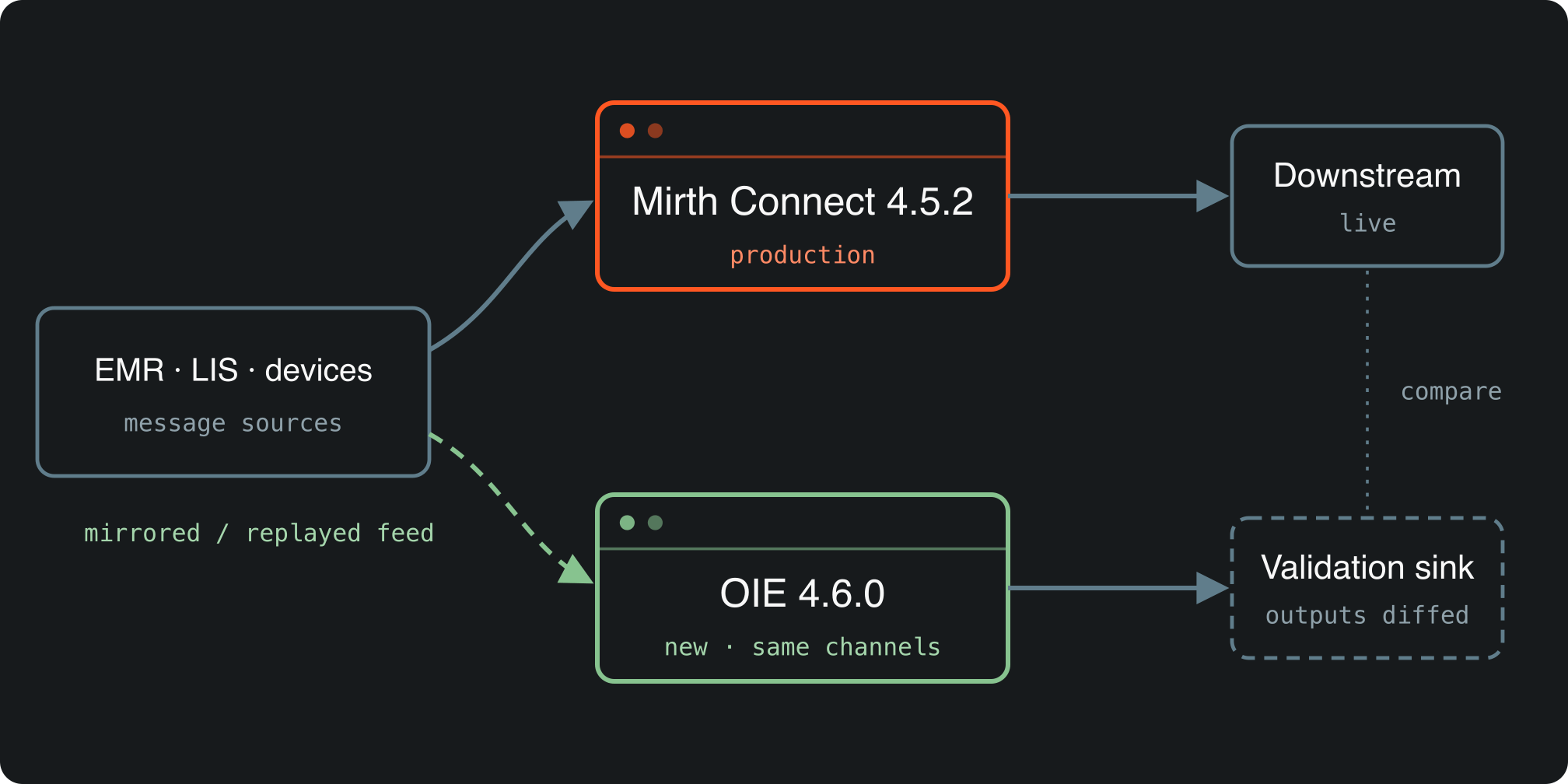
A minimal parallel-run topology. Select the image to open it full size.
Import and Review Compatibility
Import the server configuration through the GUI, importcfg, or a mirthSync push. Then do a compatibility review.
These items transfer cleanly, per the OIE release notes: all connectors, transformers, and channel scripts. OIE runs the same JavaScript engine family (Mozilla Rhino 1.7.13, with rhino.languageversion = es6 as the default). Transformer code that uses E4X runs unchanged. A proposal to move to GraalJS exists, but it is not implemented.
These items do not transfer:
- The NextGen commercial extensions. SSL Manager, Channel History, Advanced Alerting, and the other commercial extensions are licensed NextGen products. They do not ship with OIE. Replacements exist for the common cases: a free, community-donated TLS Manager plugin, plus LDAP and MFA authenticators in the OIE organization. Make an inventory of your
extensions/directory early. This is the most common source of unplanned work. - The keystore, unless you move it deliberately. The file and its passwords travel as a pair. See the pitfalls section.
- On OIE 4.6.0 specifically: custom Java code that imports
org.apache.xerces.*fails, because OIE removed Xerces. Migrate that code tojavax.xml.parsers.*andorg.xml.sax.*. HTTP parameter maps now keep their order, so code that depended on the old nondeterministic order can change behavior. Logins are now case-insensitive by default, so check for usernames that differ only by case.
Test: Show Equivalence, Do Not Assume It
“Functionally identical” is a statement about the software. Your channels, your message mix, and your edge cases are the part that only you can test. This method works:
- Replay real messages. Export a representative set of production messages per channel from Mirth (
exportmessages). Replay them through the matching OIE channel (importmessages). Include the problem messages: malformed MSH segments, oversized OBX payloads, and the messages that caused incidents in the past. - Diff the outputs. Record what each engine sends downstream. Compare the outputs mechanically with checksums or structured diffs, per message type and per channel. Do not compare by visual inspection.
- Run in parallel. Send the same live traffic to both engines where the downstream side permits it, or mirror the feed into a validation sink as shown in the diagram. Run the parallel test through a full business cycle: end-of-day batches, weekly jobs, and peak-volume periods.
- Watch the operational metrics. Queue depths, error rates, and memory use under sustained load. You validate an engine, not only message syntax.
Vendor documents describe single-instance migrations that complete in one to three days plus a test period. Treat that as a minimum for a small deployment, not a promise. The test period takes the most time, and it should.
Plan the Cutover and the Rollback
Cut over per interface, in batches, not the whole deployment at once. Move the low-risk, low-volume interfaces first. Move the high-volume ADT interfaces after the process is proven. For each batch:
- Coordinate with the upstream and downstream system owners. If you kept the same endpoints, most owners only need a notification, not a change.
- Define the rollback before the cutover, and rehearse it one time: point the feed back to the old engine, and confirm the message flow. A rollback that depends on improvisation is not a plan.
- Keep Mirth installed after the cutover. It is the immediate rollback target at first. After that, it is a read-only archive of message history until your retention requirements end. Message history does not migrate, so keep the old database readable.
The migration is complete when the last interface has run a full business cycle on OIE with a clean reconciliation. It is not complete when the last channel imports.
Known Pitfalls
Each item below is verified against the OIE release notes and documentation, or learned in our own migration work:
- Java 17 is mandatory on OIE 4.6.0. Hosts on Java 8 or 11 need a JVM plan or the installer with the included JRE.
- The keystore travels as a pair. Move
appdata/keystore.jkstogether with thekeystore.storepassandkeystore.keypassvalues from the oldmirth.properties(type JCEKS). A new OIE installation generates its own keystore with random passwords. The old file with the new passwords breaks HTTPS and Administrator connections. A related upstream defect: nextgenhealthcare/connect#5466. - Commercial extensions do not transfer. Make the extension inventory first. Plan replacements (TLS Manager, LDAP, MFA plugins) or scope the gap.
- Scripts that call
mccommandfail until you point them atoiecommand. - Custom JVM options do not apply until you move them to
conf/oieserver.vmoptionsandconf/oieservice.vmoptions. - Operational procedures reference removed tools. The Web Admin dashboard and the Mirth Manager tray tool are gone. Update the procedures before the first incident, not during it.
- Derby is not a production database. Configure PostgreSQL, MySQL, MariaDB, Oracle, or SQL Server before go-live.
- Imports of
org.apache.xerces.*fail on 4.6.0. Search your custom code and code templates now, not during the cutover. - HTTP parameter order changed on 4.6.0. The order is now stable. Code that depended on the old behavior can change results.
- Logins are case-insensitive on 4.6.0. Check for username collisions before the upgrade.
- Installer trust warnings appear from SmartScreen and Gatekeeper. Warn the person who runs the installer.
- Message history stays behind. Exports move configuration, not years of message data. Keep the old database readable until the retention windows close.
Sources and Further Reading
Primary sources to bookmark, because this landscape still moves:
- OIE project site and official documentation
- OIE release notes — the 4.5.2-tp.1 and 4.6.0 notes are the two that matter for migration plans
- NextGen’s license announcement
- OIE governance — the maintainer structure of the project you will depend on
- mirthSync — Git-friendly configuration sync for both engines
Where We Can Help
We do this migration for healthcare organizations: assessment, full execution, or support after the cutover. Every person on our staff holds a current HIPAA certification, and the same team builds and integrates the systems on both ends of the interface engine. If you do not want to run this project alone, see our Mirth-to-OIE migration service or the broader legacy system modernization practice. Contact us with questions about your environment.